Wasalea Technologies  ·  Flagship product

Liquidity Manager

Know exactly where your float is.

Every shilling of float and cash you deploy to your agents, tracked from the morning deployment to the evening repayment — with what each one still owes you visible at a glance.

Version 3.1.0  ·  Windows & macOS  ·  Read‑only Android tablet companion

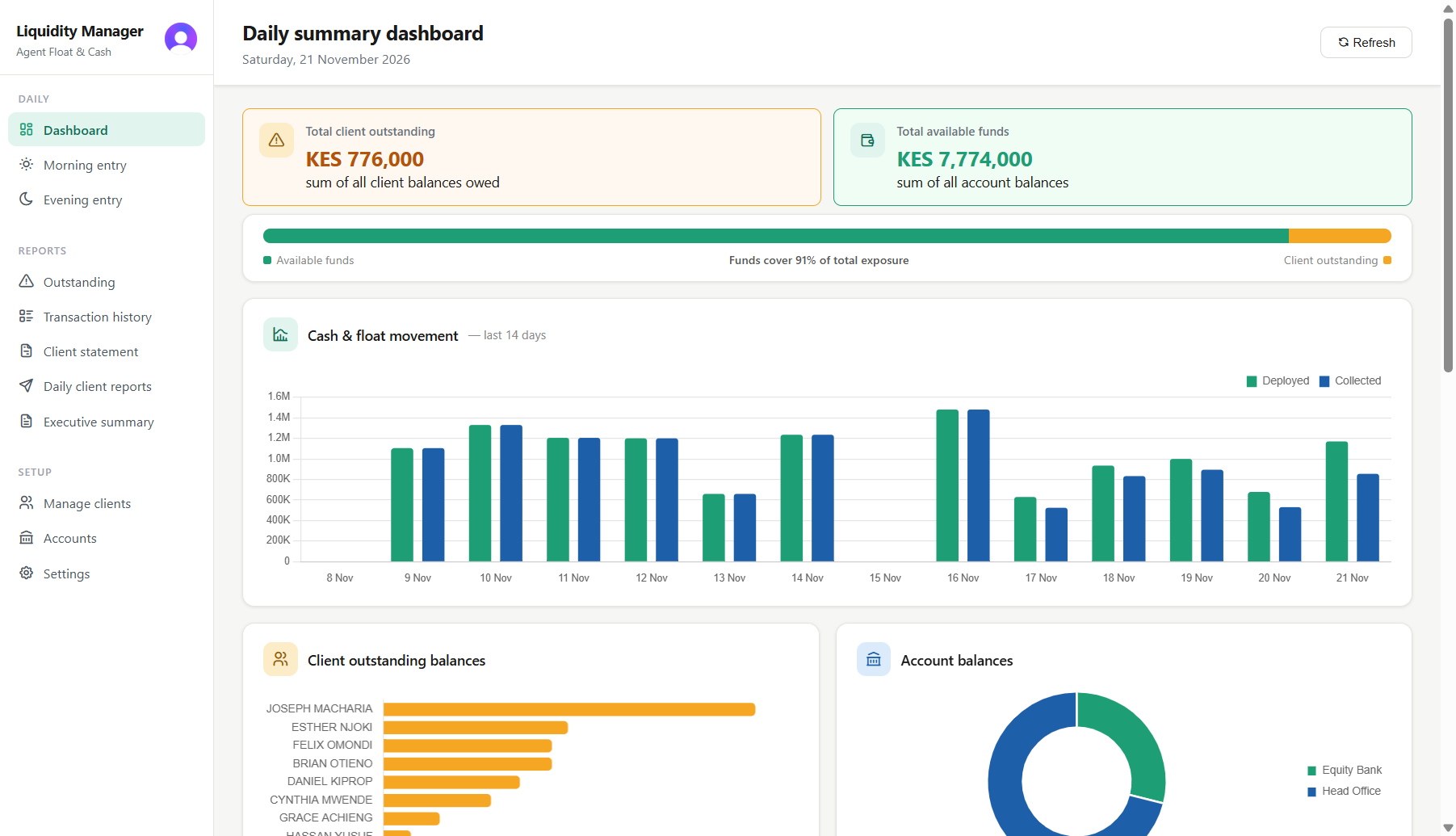
Liquidity Manager dashboard showing total client outstanding of KES 776,000 against KES 7,774,000 available funds, a bar showing funds cover 91% of total exposure, and a 14-day chart of money deployed and collected

The float goes out on trust. The record shouldn't.

Three things go wrong in almost every agent business. Here is what the software does about each.

Money leaves before dawn

Float and cash go out to several agents every morning, often by phone, often in a hurry. By mid‑morning nobody can say precisely how much is out there.

What the software does Records the float and cash deployed to every agent as it goes out, so the day's exposure is a number you can read rather than one you have to reconstruct.

Repayments come back in pieces

An agent repays part of yesterday against part of today. Matching those payments to the right deployment by hand is where the errors creep in.

What the software does Settles each repayment against the oldest outstanding deployment first, automatically, so partial payments land in the right place and debt ages honestly.

Spreadsheets quietly drift

One shared workbook, several people, a formula someone dragged too far. The numbers stop agreeing and nobody can prove which version was right.

What the software does Keeps deployments, collections, balances and transaction history in a structured record with an activity log — and imports your existing spreadsheet, so you are not starting from nothing.

The product

Your entire liquidity position, in one place.

Liquidity Manager runs on the computer that keeps your books. These are its working screens.

Dashboard showing total client outstanding, available funds, a 14-day deployment chart and per-agent balances
The day at a glance — what is out, what came back, where you stand.
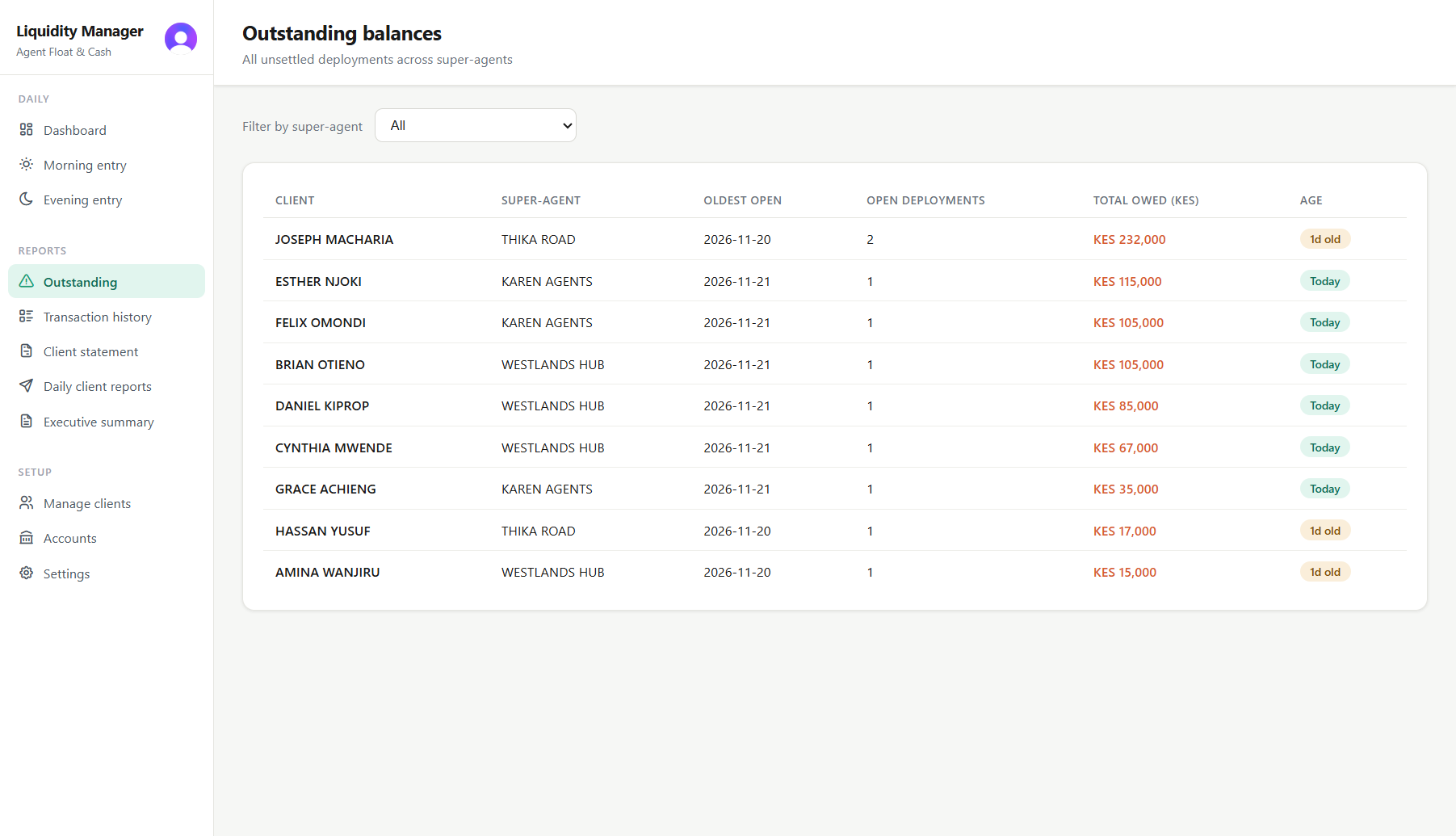
Outstanding balances per agent, aged and colour-coded, with totals owed
Who owes what, shaded by how long the money has been out.
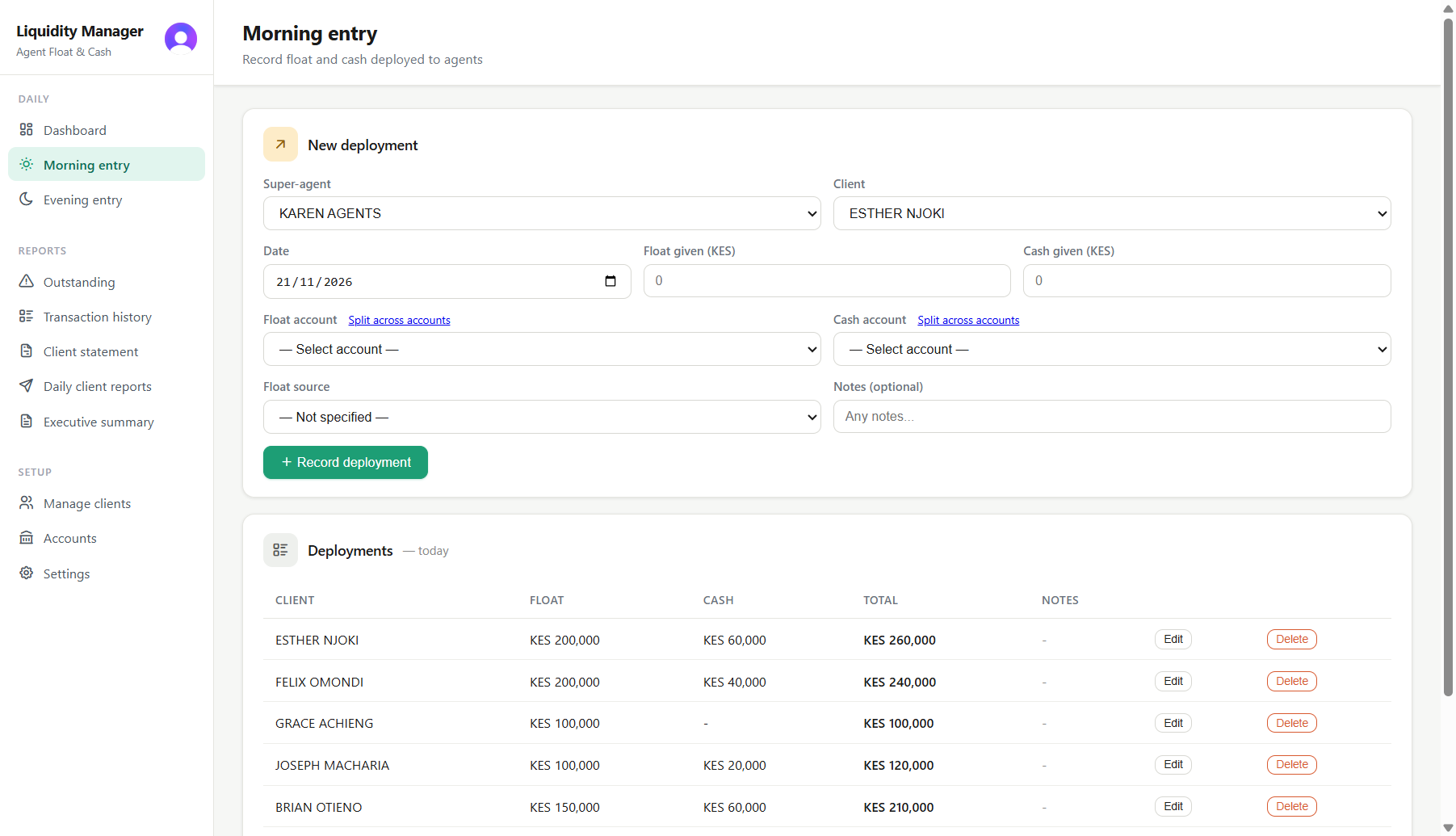
Recording a morning float and cash deployment to an agent, with the day's deployments listed below
The morning deployment and the evening repayment, entered once each.
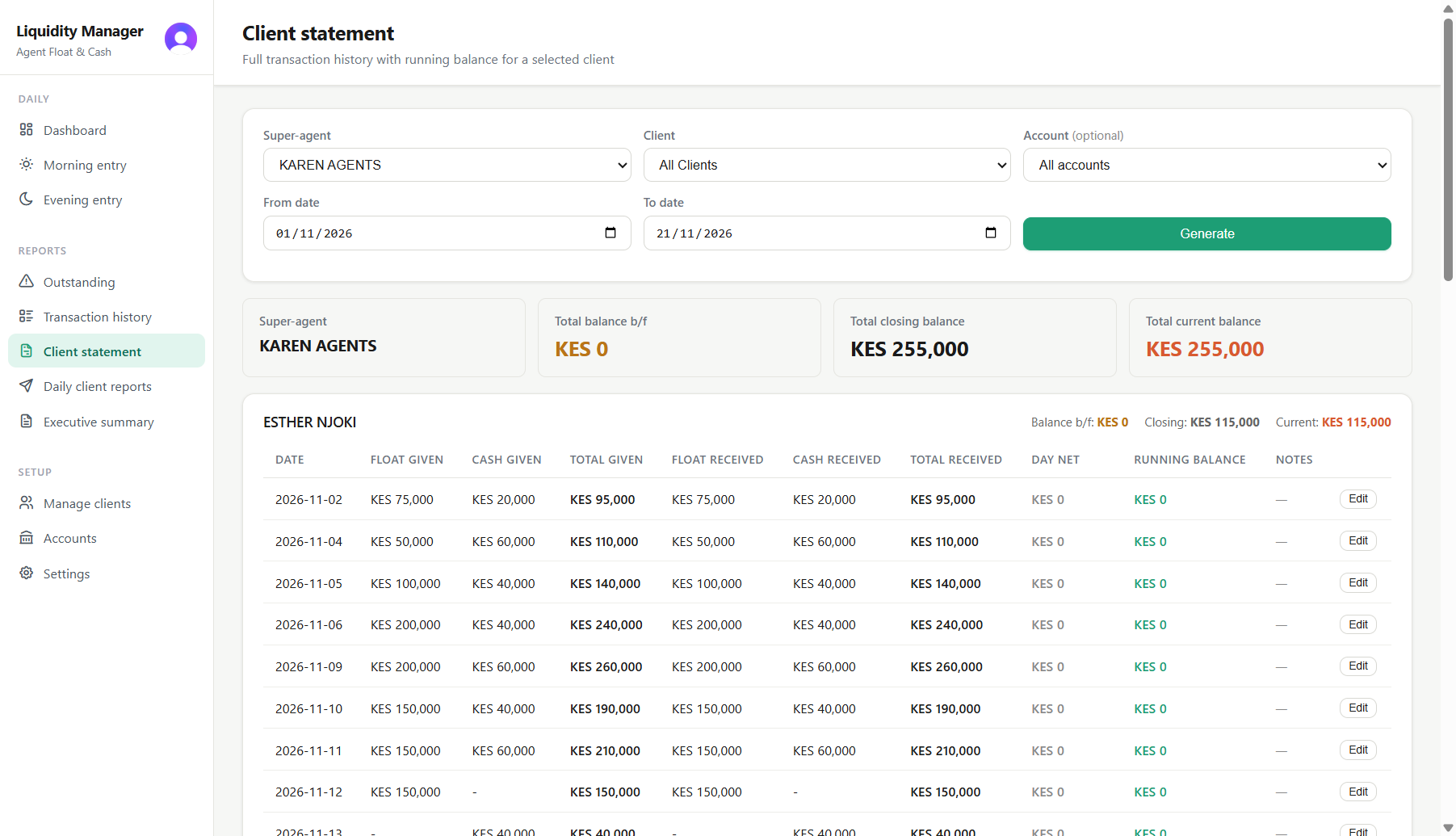
A client statement listing every deployment and collection with a running balance
One agent's full history, exportable to PDF or Excel.
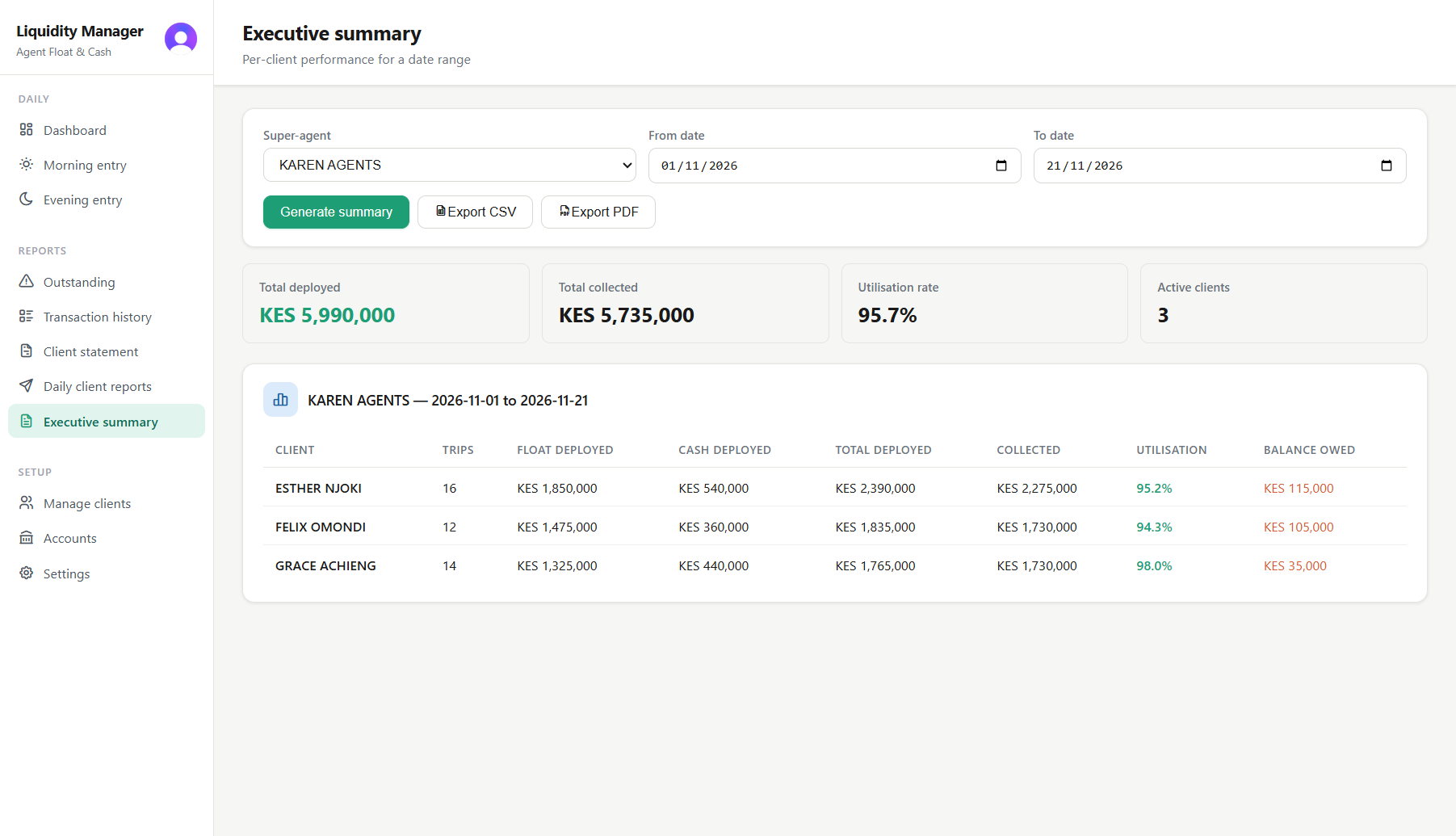
Executive summary: total deployed, total collected, utilisation rate and per-agent performance for a date range
Deployed, collected and utilisation per agent over any date range.
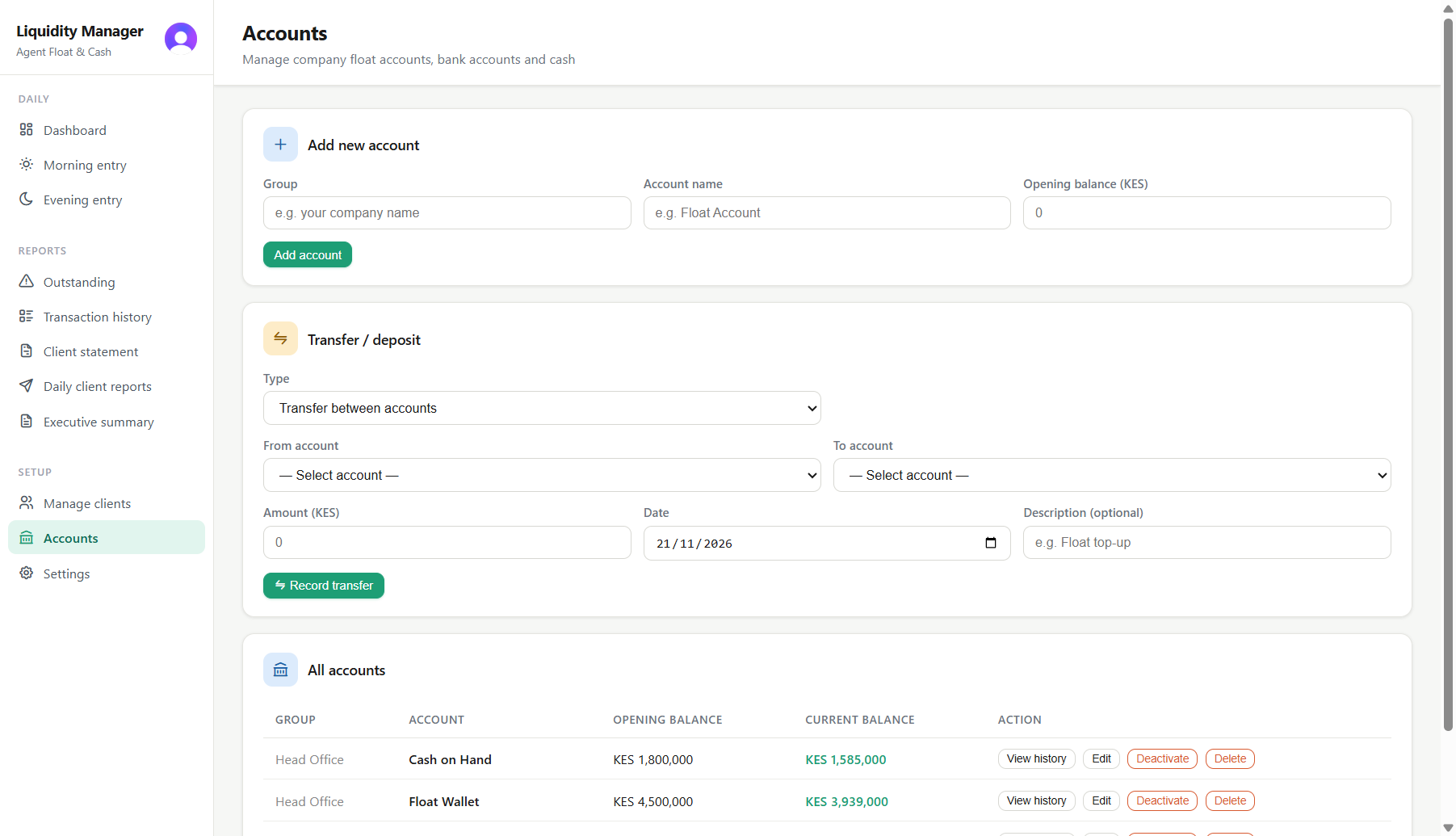
Float and cash account balances with their transaction history
Company float and cash accounts, transfers between them, and a ledger for each.
Earlier versions of the books, with a preview before anything is put back.
The same position on an Android tablet, read-only.

How it works

Two entries a day. That's the whole routine.

  1. Morning — record what went out

    Enter the float and cash deployed to each agent. That sets the day's position; there is nothing to reconstruct later.

  2. Evening — record what came back

    Enter each repayment once. It settles against the oldest open deployment first, so partial payments land correctly without you doing the arithmetic.

  3. Any time — see where you stand

    Outstanding balances by age, deployment and collection activity, and per-agent performance over any period you choose.

Features

Built for how this business actually runs

Oldest-first settlement

Repayments clear against the oldest outstanding deployment automatically, so an agent's debt ages the way it should and nothing sits uncleared by accident.

Outstanding balances, aged

One screen for who owes what, shaded by how long it has been owed — the overdue positions find you rather than the other way round.

Per-agent performance

An executive summary for any date range: deployed, collected and utilisation per agent, so you can see who turns float over and who merely holds it.

Super-agent grouping

Group agents under a super-agent and read outstanding balances and performance for the group as a whole, not just one outlet at a time.

Statements and exports

Per-agent statements and executive summaries export to PDF, Excel or CSV — for a lender, an auditor, or an agent who disputes a figure.

Bring your spreadsheet

Import an existing workbook, with a preview of what will be brought in before you commit to it. You do not start from an empty book.

Accounts and transfers

Keep separate accounts for the money you work with, move funds between them, and read a ledger for each one.

Audit trail

An activity log of financial actions, and a separate record of deletions — what was removed, when, and by whom.

Team access, one editor

Several people can have the books open. One person edits at a time and the app names who that is, so two users cannot overwrite each other.

Simultaneous editing by several people at once is deliberately not supported — one editor at a time is what keeps the figures trustworthy.
Reliability

Your business records deserve protection.

This software holds your financial records, so it is worth being precise about how they are kept — and about what that does and does not guarantee.

Your data sits on your machine

Liquidity Manager is a desktop application with a local database. The working copy of your books lives on the computer you install it on, not on somebody else's server.

Synchronised across your computers

Authorised machines in your business can work from the same books, with controls that stop two people's changes colliding.

Earlier versions are kept

Saves build a history. You can look through previous versions of the database, see what a given one contains beside the live figures, and put it back.

A restore never deletes

Restoring promotes an earlier version rather than erasing the current one, and the copy being replaced stays in the history — so a restore is itself reversible. The local database is kept beside the new one as a recovery file.

Stale data cannot overwrite newer data

Every upload is conditional on the stored copy still being the one your machine started from. An install holding old data cannot overwrite newer work, and a refused save is written to a recovery file rather than discarded.

Restores are recorded

Restore operations are logged, so a change of that size leaves a trace rather than happening quietly.

What we don't claim

No software is immune to hardware failure, theft, ransomware or human error, and we will not tell you otherwise. Version history reaches back as far as the retention period on your storage, not forever. You should keep your own backups, limit who can use the machine that holds your books, and test that you can actually restore from a backup before you need to. We are happy to walk you through that.

Tablet companion

Your business position, wherever you are.

An Android tablet app for watching the business when you are not at the desk — out among the outlets, or away from the office entirely. It shows the same books the desktop application keeps.

  • Outstanding balances per client, and the largest of them
  • Money deployed and collected today
  • Account balances and available funds
  • Today's activity as it is entered
  • Synchronisation status, and who currently holds the editor role

Read-only, deliberately. Every financial entry is made in the desktop application. The tablet shows you the position; it cannot change it, so it cannot be the source of a mistake made in a hurry.

Ask about the tablet app

Download

Get Liquidity Manager

Current release 3.1.0. Install it on the machine that will keep your books.

Windows

Version
3.1.0
Size
51 MB
Requires
Windows 10 or 11, 64-bit

Run the installer and follow the prompts. It adds a desktop shortcut; the application opens in your browser against a server running on your own machine.

Download installer

macOS

Version
3.1.0
Size
146 MB
Requires
macOS on Apple silicon

Open the disk image and drag the application into Applications. On first launch macOS may ask you to confirm opening it.

Download disk image

User guide

Format
PDF
Covers
Daily use, reports, backups
Cost
Free to read

The full manual. Worth reading before you commit to anything — it shows how the software is actually used day to day.

Read the guide

Upgrading an existing install

The same installer upgrades an existing installation and is not intended to touch your business database. We will not promise that an upgrade can never affect data — no honest vendor can. Take a backup before you upgrade, and if an upgrade matters to you, tell us and we will talk it through first.

The Android tablet companion is not distributed from this page. It is issued directly, with the licence for your business — ask us for it.

Pricing

A plan that fits your operation.

Whether you manage a small group of agents or a growing network, we'll help you find the right Liquidity Manager package.

About

Wasalea Technologies

Wasalea Technologies develops practical software designed to help businesses operate with greater visibility, control and confidence.

We build tools that address real operational problems, simplify processes that have grown complicated, and give business owners a clearer view of what is actually happening in their operation.

Liquidity Manager is our first flagship product, built for mobile money dealers, super-agents and M‑PESA agent businesses to manage deployments, collections and outstanding balances. Kenya is the market we know best; the problems the software solves are not unique to it.

More products will follow. We would rather say that plainly than pretend there are already several.

Contact

Talk to Wasalea

Tell us roughly how many agents you deploy to and how you track float today. We read every message, and a person replies.

We use what you send here to answer your enquiry, and for nothing else. See our privacy policy.